When this helps
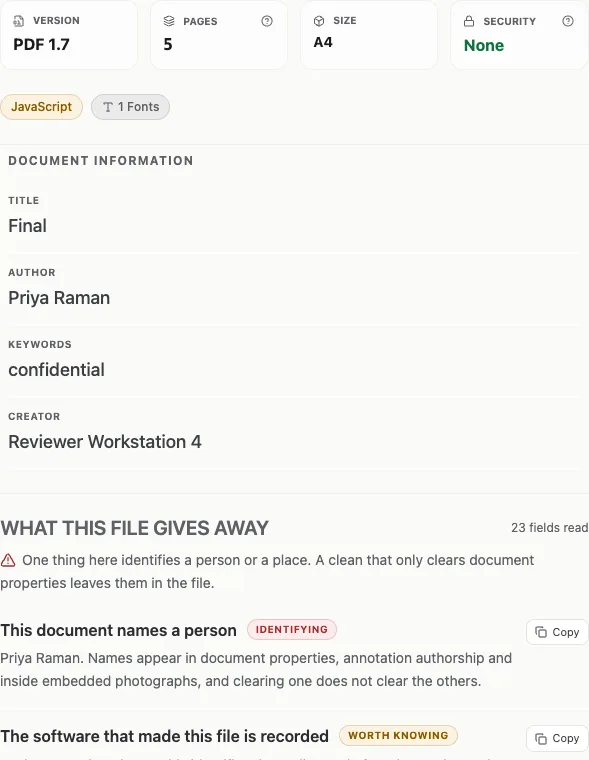
You receive a PDF with a colleague’s name in the Author field even though someone else sent it. Before deciding what that means, check which part of the file supplied the name. A PDF can contain document properties, an XMP packet and annotation authors that tell different stories.
Try it in the checker
Open the PDF Metadata Checker and select your file. Summary shows the familiar properties first. Wait for the additional checks to finish before downloading a final report.
Choose Everything to search fields by name or value. Search “author” to find the document author alongside other author-related entries. Read the section heading: an annotation author is not necessarily the document author. Expand Current XMP source to inspect the active XML packet.
Read the result in context
Imagine a report with Author “Sample Team”, Creator “Word” and Producer “PDF export service”. These are synthetic examples. The author may be a template default; Creator names the originating application, while Producer usually names the software that wrote the PDF. None alone establishes who typed the text.
A disagreement between document properties and XMP is worth recording as a disagreement. Do not combine the two into a single account of authorship. The checker keeps the sources separate so you can see both.
What this cannot establish
Metadata can be edited, copied from templates or removed. Dates may reflect a software clock or an export rather than the moment the underlying document was created. The checker does not independently verify those dates. Keep the original file when you need to compare it later; a metadata edit creates a different copy.