When this helps
You can search a scanned PDF even though the page is a picture. That usually means an OCR text layer sits behind the image. Other PDFs position text outside the page or make it transparent. These are useful things to inspect, but none is inherently evidence of deception.
Try it in the checker
Choose Everything, then Page content in Explore this PDF. Click Check page content. The checker examines a bounded batch of pages only after you ask, keeping the initial metadata workflow quick.
Each page reports extracted text runs, uncommon styles, transparent text, off-page text and overlaps. Expand Read extracted text and positions to see the text and coordinates. The interface shows the first 100 runs; JSON retains extracted runs within the per-page cap. Use the coverage line and next-batch button for longer files.
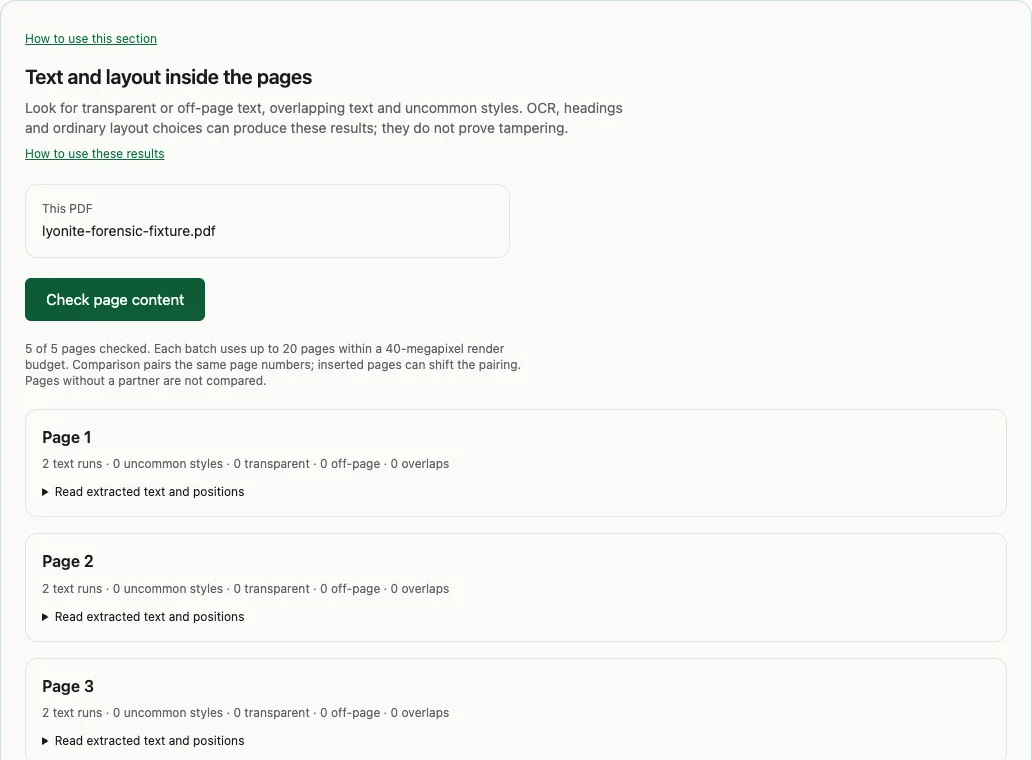
Read the result in context
A page containing a scanned letter and a matching transparent text layer is a normal OCR result. A title styled differently from every paragraph can appear as an uncommon style. Overlapping runs can come from layout, repeated drawing or text extraction behaviour.
Use the page number to inspect the visible PDF and compare the extracted text. If a value is materially different, compare a known copy in Compare PDFs rather than treating a geometry count as a conclusion.
What this cannot establish
The checker inspects extracted text and geometry; it does not fully model whether every text run is visible after clipping, masks or other drawing operations. It does not OCR page images. Counts are limited by the sampled pages and extracted-run caps. Position measurements help locate evidence, but their interpretation depends on the page coordinate system and rendering.